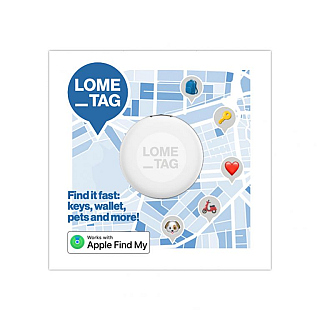
Lome_Tag Find My Tag 1x White Apple iOS & Android


Product omschrijving
LOME_TAG
Nooit meer zoeken. Altijd weten waar je spullen zijn.
Raak je regelmatig je sleutels, tas, fiets, koffer of portemonnee kwijt? Met de LOME_TAG houd je altijd zicht op wat voor jou belangrijk is. Deze slimme, compacte tracker helpt je jouw waardevolle spullen snel en eenvoudig terug te vinden, waar je ook bent.
De LOME_TAG werkt naadloos samen met zowel het Apple Zoek mijn-netwerk als het Android Vind mijn apparaat-netwerk, waardoor je profiteert van een wereldwijd netwerk van miljoenen apparaten.
Let op: de LOME_TAG kan gekoppeld worden aan óf het Apple-netwerk óf het Android-netwerk. Gelijktijdig gebruik van beide netwerken is niet mogelijk.
Vind je spullen in een handomdraai
Ben je in de buurt van je verloren item? Via Bluetooth lokaliseer je de LOME_TAG tot op ongeveer één meter nauwkeurig en laat je hem een geluidssignaal afspelen. Bevindt je item zich verder weg? Dan maakt de tracker gebruik van het wereldwijde netwerk van Apple- of Android-apparaten om de locatie anoniem door te geven. Zo vergroot je de kans om je eigendommen snel terug te vinden, waar ze zich ook bevinden.
Privacy staat voorop
Jouw locatiegegevens zijn altijd veilig. Zowel binnen het Apple Zoek mijn-netwerk als het Android Vind mijn apparaat-netwerk worden alle gegevens end-to-end versleuteld en volledig anoniem verwerkt. Alleen jij hebt toegang tot de locatie van jouw LOME_TAG.
Maak hem compleet
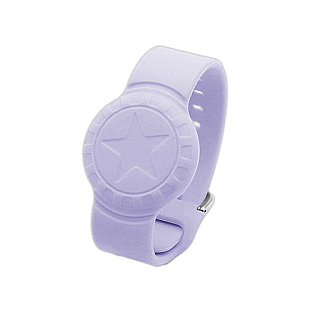
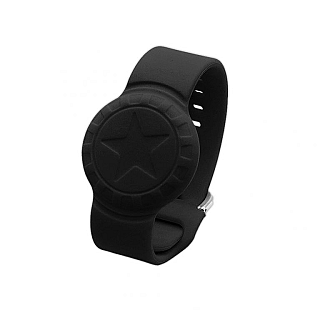
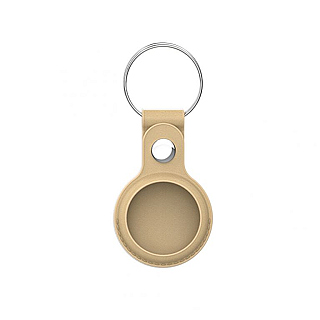
Combineer de LOME_TAG met een stijlvol accessoire. Kies voor een praktische sleutelhanger of een comfortabel, waterbestendig siliconen polsbandje.
Waarom kiezen voor de LOME_TAG?
✓ Werkt met Apple én Android
Compatibel met het Apple Zoek mijn-netwerk en Android Vind mijn apparaat.
✓ Nauwkeurige locatiebepaling
Vind je spullen tot op circa 1 meter nauwkeurig binnen Bluetooth-bereik.
✓ Wereldwijde dekking
Profiteer van miljoenen Apple- en Android-apparaten wereldwijd.
✓ Tot 1 jaar batterijduur
Inclusief vervangbare CR2032-batterij voor langdurig gebruik zonder zorgen.
✓ Water- en stofbestendig (IP64)
Bestand tegen dagelijks gebruik, regen en stof.
✓ Optimale privacybescherming
Volledig anonieme en end-to-end versleutelde locatiegegevens.
✓ Binnen één minuut klaar voor gebruik
Snel gekoppeld en direct beschermd tegen zoekraken.
Slim volgen. Snel terugvinden. Altijd gerust op pad met de LOME_TAG
Gebruiksaanwijzing Apple iOS
Koppelen: Zorg dat de Bluetooth is ingeschakelt. Schakel de LOME_TAG in door de knop 5 seconden ingedrukt te houden (u hoort een piep). Open de app "Zoek mijn" op uw apparaat, ga naar "Objecten, druk op het plusteken > "Voeg ander object toe" >. Uw apparaat zoekt nu naar de tag. Selecteer de LOME_TAG en geef deze een naam. De koppelingsmodus duurt 10 minuten na inschakeling of verwijdering.
Functies: • Signaal geven: Klik op "Geluid afspelen" in de app. • Vinden via netwerk: Schakel de "Verloren modus" in de app in. Het Find My-netwerk helpt bij de locatiebepaling buiten Bluetooth-bereik. Apparaatbediening: • In-/Uitschakelen: Houd de knop 5 seconden ingedrukt om in te schakelen (of vanuit slaapstand). Druk 5x snel op de knop om naar de slaapstand te gaan. • Status controleren: Dubbelklik op de knop. U hoort een signaal (gekoppeld/niet verbonden of niet gekoppeld) of een korte tik (gekoppeld/verbonden). Geen geluid betekent slaapstand. • Fabrieksinstellingen herstellen: Na het inschakelen, druk 4x snel en houd de knop direct daarna 5 seconden ingedrukt tot het resetgeluid stopt. • Verwijderen: Selecteer "Object verwijderen" in de app. Het apparaat blijft 10 minuten in koppelingsmodus. Na het verwijderen van het apparaat zal het apparaat niet uitschakelen en in de koppelingsmodus blijven. Als er binnen 10 minuten geen nieuwe koppeling tot stand komt, wordt het apparaat automatisch uitgeschakeld.
Gebruiksaanwijzing Android
Koppelen: Zorg dat de Bluetooth is ingeschakelt. Schakel de LOME_TAG in door de knop 5 seconden ingedrukt te houden (u hoort een piep). Selecteer 'Verbinden' en 'Akkoord en doorgaan' in de pop-upvensters. Open de Find Hub-app om de functies te gebruiken.
Functies: • Signaal geven: Klik op "Geluid afspelen" in de app. • Naam wijzigen: Gebruik het tandwielpictogram om naar Instellingen te gaan. Apparaatbediening: • Inschakelen: Houd de knop 5 seconden ingedrukt. • Uitschakelen: Druk 5x snel op de knop om naar de slaapstand te gaan. • Fabrieksinstellingen herstellen: Druk 4x snel op de knop en houd deze direct daarna ingedrukt totdat u een tweede geluidssignaal hoort. • Verwijderen: Ga in de app naar Instellingen en selecteer 'Verwijderen uit Zoekcentrum'. Het apparaat blijft 10 minuten in koppelingsmodus. Na het verwijderen van het apparaat zal het apparaat niet uitschakelen en in de koppelingsmodus blijven. Als er binnen 10 minuten geen nieuwe koppeling tot stand komt, wordt het apparaat automatisch uitgeschakeld.
Specificaties
Misschien ook interessant...